Way-Up
Directory Servers & LDAP
Hierarchical data structures and directory services
What is a Directory Server?
- A specialized database optimized for reading, browsing, and searching
- Stores hierarchical data (tree structure) rather than relational tables
- Designed for high read performance, low write frequency
- Primary use: Identity management, authentication, and authorization
Key Insight: Think of it as a phone book for your organization - frequently read, rarely updated.
Directory Server vs Relational Database
| Aspect |
Directory Server |
Relational Database |
| Data Structure |
Hierarchical (tree) |
Tabular (rows/columns) |
| Optimization |
Read-heavy workloads |
Balanced read/write |
| Query Language |
LDAP filters |
SQL |
| Schema |
Object classes |
Tables & relations |
| Transactions |
Limited/None |
Full ACID support |
| Replication |
Multi-master native |
Varies by vendor |
Common Use Cases
Authentication & Authorization
- Single Sign-On (SSO)
- Centralized user credentials
- Group-based access control
- Application authentication
Organization Data
- Employee directory
- Organizational hierarchy
- Contact information
- Resource management
LDAP: Lightweight Directory Access Protocol
- Industry standard protocol for accessing directory services
- Operates over TCP/IP (port 389, or 636 for LDAPS)
- Defines how clients communicate with directory servers
- Supports authentication (bind), search, modify, and delete operations
Popular LDAP Implementations
- Microsoft Active Directory - Enterprise standard
- OpenLDAP - Open source, Linux-native
- Apache Directory Server - Java-based, portable
- 389 Directory Server - Red Hat sponsored
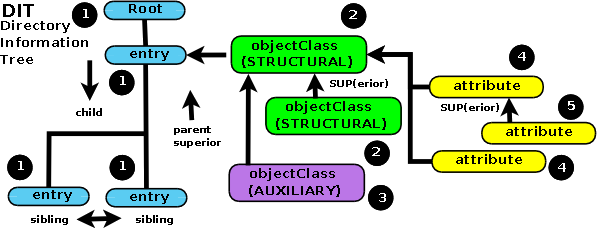
Directory Information Tree (DIT)
- Directories have a hierarchical structure called DIT
- Each node is an entry with attributes
- The tree starts from the root (suffix/base DN)
Credits: Zytrax LDAP Guide
Distinguished Name (DN) Components
| Abbreviation |
Full Name |
Usage |
DC |
Domain Component |
Domain parts (dc=example,dc=com) |
O |
Organization |
Company name |
OU |
Organizational Unit |
Department, division |
CN |
Common Name |
User or resource name |
UID |
User ID |
Unique user identifier |
C |
Country |
Country code (2 letters) |
Distinguished Name (DN)
- The DN uniquely identifies an entry in the directory
- Contains the full path from the entry to the root
- Read from left to right (most specific to least specific)
cn=John Doe,ou=Engineering,ou=People,dc=example,dc=com

# Breaking it down:
cn=John Doe        → Common Name (the user)
ou=Engineering     → Organizational Unit (department)
ou=People          → Organizational Unit (category)
dc=example,dc=com  → Domain Component (root)
Relative Distinguished Name (RDN)
- The leftmost component of a DN
- Identifies the entry within its parent container
- Must be unique among siblings
# Full DN:
cn=John Doe,ou=Engineering,ou=People,dc=example,dc=com

# RDN:
cn=John Doe

# Parent DN:
ou=Engineering,ou=People,dc=example,dc=com
Object Classes
- Define the type of entry and its allowed/required attributes
- Entries can have multiple object classes
- Three types: Structural, Auxiliary, and Abstract
Common Object Classes
| Object Class | Purpose |
|---|
inetOrgPerson | Internet/Intranet users |
organizationalUnit | Departments, divisions |
groupOfNames | Groups with members |
posixAccount | Unix/Linux accounts |
organization | Organization root |
LDAP Attributes
- Attributes store the actual data for entries
- Each attribute has a type and one or more values
- Defined by the schema (required vs optional)
Common Attributes for inetOrgPerson
cn: John Doe                    # Common Name (required)
sn: Doe                         # Surname (required)
givenName: John                 # First name
mail: john.doe@example.com      # Email address
telephoneNumber: +1-555-1234    # Phone number
uid: jdoe                       # User ID
userPassword: {SSHA}base64...   # Hashed password
memberOf: cn=developers,ou=Groups,dc=example,dc=com
LDIF: LDAP Data Interchange Format
- Standard text format for representing LDAP entries
- Used for importing, exporting, and modifying data
- Human-readable, easy to edit
# Create an organizational unit
dn: ou=People,dc=example,dc=com
objectClass: organizationalUnit
ou: People
description: Company employees

# Create a user
dn: uid=jdoe,ou=People,dc=example,dc=com
objectClass: inetOrgPerson
objectClass: posixAccount
cn: John Doe
sn: Doe
givenName: John
uid: jdoe
mail: john.doe@example.com
uidNumber: 1001
gidNumber: 1001
homeDirectory: /home/jdoe
LDAP Search Filters
- Filters define which entries to return from a search
- Use prefix notation (operator comes first)
- Support wildcards (
*) for partial matching
# Simple equality filter
(uid=jdoe)

# Presence filter (attribute exists)
(mail=*)

# Wildcard filter
(cn=John*)

# AND filter
(&(objectClass=person)(mail=*@example.com))

# OR filter
(|(department=Engineering)(department=IT))

# NOT filter
(!(accountDisabled=TRUE))

# Complex combined filter
(&(objectClass=inetOrgPerson)(|(department=IT)(department=Engineering))(!(accountDisabled=TRUE)))
LDAP Operations
| Operation | Description |
|---|
| Bind | Authenticate to the directory |
| Unbind | Close the connection |
| Search | Find entries matching criteria |
| Add | Create a new entry |
| Delete | Remove an entry |
| Modify | Change entry attributes |
| Modify DN | Rename or move an entry |
| Compare | Check if attribute has a value |
Search Scope
- Defines how deep to search in the DIT
| Scope | Description |
|---|
| base |
Only the base entry itself |
| one |
Direct children of the base entry |
| sub |
Base entry and all descendants (most common) |
# Search with subtree scope
ldapsearch -x -b "dc=example,dc=com" -s sub "(objectClass=person)"

# Search only direct children
ldapsearch -x -b "ou=People,dc=example,dc=com" -s one "(objectClass=*)"
LDAP Authentication (Bind)
- Anonymous Bind: No credentials, limited access
- Simple Bind: DN + password (cleartext - use with TLS!)
- SASL Bind: Advanced mechanisms (Kerberos, etc.)
# Anonymous bind
ldapsearch -x -H ldap://localhost -b "dc=example,dc=com"

# Simple bind with credentials
ldapsearch -x -H ldap://localhost \
    -D "cn=admin,dc=example,dc=com" \
    -W \
    -b "dc=example,dc=com" \
    "(uid=jdoe)"

# Using LDAPS (secure)
ldapsearch -x -H ldaps://localhost:636 \
    -D "cn=admin,dc=example,dc=com" \
    -W \
    -b "dc=example,dc=com"
LDAP Security Best Practices
Transport Security
- Use LDAPS (port 636) or StartTLS
- Never send passwords in cleartext
- Use valid TLS certificates
Access Control
- Implement ACLs (Access Control Lists)
- Principle of least privilege
- Audit bind operations
Password Storage
- Always store hashed passwords:
{SSHA}, {PBKDF2}
- Enable password policies (complexity, expiration)
Microsoft Active Directory
- Enterprise directory service built on LDAP
- Integrates with Windows domain authentication
- Additional features: Group Policy, Kerberos, DNS integration
AD-Specific Attributes
# Active Directory user attributes
sAMAccountName: jdoe           # Pre-Windows 2000 logon
userPrincipalName: jdoe@corp.example.com
distinguishedName: CN=John Doe,OU=Users,DC=corp,DC=example,DC=com
memberOf: CN=Developers,OU=Groups,DC=corp,DC=example,DC=com
objectGUID: {unique-guid-here}
objectSid: S-1-5-21-...
LDAP Integration with Java
// Using Spring LDAP
@Configuration
public class LdapConfig {
    @Bean
    public LdapContextSource contextSource() {
        LdapContextSource ctx = new LdapContextSource();
        ctx.setUrl("ldap://localhost:389");
        ctx.setBase("dc=example,dc=com");
        ctx.setUserDn("cn=admin,dc=example,dc=com");
        ctx.setPassword("secret");
        return ctx;
    }

    @Bean
    public LdapTemplate ldapTemplate(LdapContextSource ctx) {
        return new LdapTemplate(ctx);
    }
}

// Searching for users
@Service
public class UserService {
    @Autowired
    private LdapTemplate ldapTemplate;

    public List<String> findAllUsernames() {
        return ldapTemplate.search(
            "ou=People",
            "(objectClass=inetOrgPerson)",
            (AttributesMapper<String>) attrs ->
                (String) attrs.get("uid").get()
        );
    }
}
Spring Security with LDAP
@Configuration
@EnableWebSecurity
public class SecurityConfig {

    @Bean
    public SecurityFilterChain filterChain(HttpSecurity http) throws Exception {
        http
            .authorizeHttpRequests(auth -> auth
                .requestMatchers("/admin/**").hasRole("ADMIN")
                .anyRequest().authenticated()
            )
            .formLogin(withDefaults());
        return http.build();
    }

    @Bean
    public EmbeddedLdapServerContextSourceFactoryBean contextSourceFactoryBean() {
        EmbeddedLdapServerContextSourceFactoryBean bean =
            EmbeddedLdapServerContextSourceFactoryBean.fromEmbeddedLdapServer();
        bean.setPort(8389);
        return bean;
    }

    @Bean
    public AuthenticationManager authManager(BaseLdapPathContextSource ctx) {
        LdapBindAuthenticationManagerFactory factory =
            new LdapBindAuthenticationManagerFactory(ctx);
        factory.setUserDnPatterns("uid={0},ou=People");
        return factory.createAuthenticationManager();
    }
}
Setting Up Apache Directory Server
Option 1: Download Standalone
Option 2: Docker
# docker-compose.yml
services:
  apacheds:
    image: greggigon/apacheds
    restart: unless-stopped
    ports:
      - "10389:10389"
    volumes:
      - ./apacheDS/data:/data
# Start the container
docker-compose up -d
Apache Directory Studio
Connection Settings
| Hostname | localhost |
| Port | 10389 (ApacheDS) or 389 (standard) |
| Bind DN | uid=admin,ou=system |
| Password | secret |
Command Line: ldapsearch
# List all entries under base DN
ldapsearch -x -H ldap://localhost:10389 \
    -D "uid=admin,ou=system" -W \
    -b "dc=example,dc=com" \
    "(objectClass=*)"

# Find a specific user
ldapsearch -x -H ldap://localhost:10389 \
    -D "uid=admin,ou=system" -W \
    -b "ou=People,dc=example,dc=com" \
    "(uid=jdoe)" \
    cn mail telephoneNumber

# Find all users in a group
ldapsearch -x -H ldap://localhost:10389 \
    -D "uid=admin,ou=system" -W \
    -b "dc=example,dc=com" \
    "(&(objectClass=inetOrgPerson)(memberOf=cn=developers,ou=Groups,dc=example,dc=com))"
Command Line: ldapadd & ldapmodify
# Add entries from LDIF file
ldapadd -x -H ldap://localhost:10389 \
    -D "uid=admin,ou=system" -W \
    -f users.ldif

# Modify an entry
ldapmodify -x -H ldap://localhost:10389 \
    -D "uid=admin,ou=system" -W << EOF
dn: uid=jdoe,ou=People,dc=example,dc=com
changetype: modify
replace: telephoneNumber
telephoneNumber: +1-555-9999
-
add: title
title: Senior Developer
EOF

# Delete an entry
ldapdelete -x -H ldap://localhost:10389 \
    -D "uid=admin,ou=system" -W \
    "uid=jdoe,ou=People,dc=example,dc=com"
Managing Groups
# Create a group
dn: cn=developers,ou=Groups,dc=example,dc=com
objectClass: groupOfNames
cn: developers
description: Development team
member: uid=jdoe,ou=People,dc=example,dc=com
member: uid=asmith,ou=People,dc=example,dc=com

# Alternative: groupOfUniqueNames (prevents duplicate members)
dn: cn=admins,ou=Groups,dc=example,dc=com
objectClass: groupOfUniqueNames
cn: admins
uniqueMember: uid=admin,ou=People,dc=example,dc=com
Note: groupOfNames requires at least one member. Use groupOfUniqueNames for stricter membership control.
Real-World Applications
- SSH Authentication: Centralized Linux user management with SSSD
- Web Applications: Spring Security LDAP authentication
- Email Systems: Address book and routing (Postfix, Dovecot)
- VPN Access: OpenVPN with LDAP backend
- WiFi Authentication: RADIUS with LDAP (FreeRADIUS)
- Git/DevOps: GitLab, Jenkins, SonarQube LDAP integration
Summary
- Directory servers are optimized for read-heavy identity data
- LDAP is the standard protocol for directory access
- Data is organized in a hierarchical tree (DIT)
- DN uniquely identifies each entry
- Object classes define entry types and attributes
- Filters enable powerful searches
- Always use TLS/SSL in production