Java Fundamentals

Loops, Arrays, and Recursion

while, do-while, for loops, arrays, and recursive algorithms

Summary of the last lecture

  • We learnt to use the IDE to write and run Java code
  • We saw control flow statements: if(){}else{} and switch(){case:}
  • We learned about debugging with breakpoints and step execution
Now let's apply activity diagrams to model our program flow!

Applying Activity Diagrams

In Lecture 2, we learned the fundamentals of activity diagrams:

  • Components: initial/final nodes, activities, decisions, fork/join
  • Swimlanes to partition by responsibility
  • Guard conditions for controlling flow
Now: Let's apply activity diagrams to model a real project scenario!

Project Scenario: Identity Management

Let's model this project requirement with an activity diagram:
"Your application should comport a scenario which authenticates a user, and makes him use the Identity management through predefined methods, Create, Update, Delete ..."

Identity Management: Activity Diagram
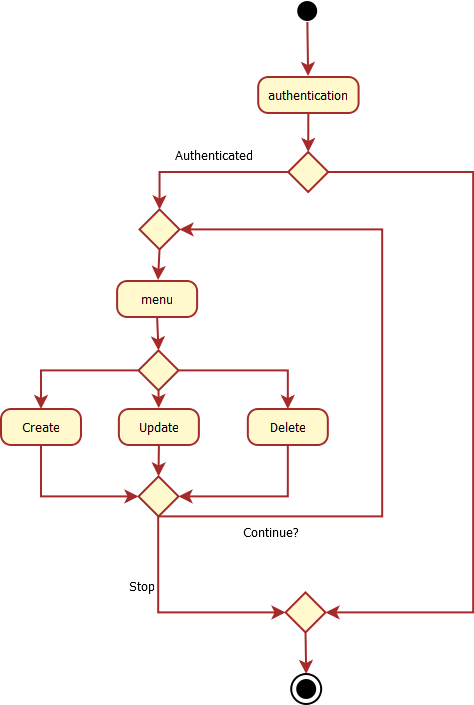
Exercise (part of the project) : Realize the authentication of the application

Use what you learnt about the user input/output to realize a login functionality
  • This corresponds to the first part of the activity diagram
  • The good "credentials" (couple of a login and a password) will be hardcoded
  • If the user is authenticated, he is proposed a menu, inviting him to select among 3 operations (Create, Modify, Delete)

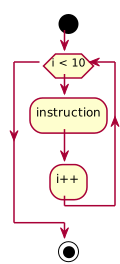
Repeat operations in Java : the while loop

// while
int size = 10;
int i = 0;
while (i < size) {
 //Some repeated instruction
 i++;
}
	

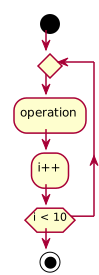
Repeat operations in Java : the do-while loop

// while
int size = 10;
int i = 0;
do{
 //Some repeated instruction
 i++;
} while (i < size);
	

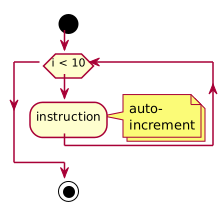
Repeat operations in Java : the for loop

// for-loop
String[] table = new String[10];
for (int i = 0; i < 10; i++) {
	String current = table[i];
	System.out.println(current);
}

// for-loop, "foreach" way
for (String s : table) {
	System.out.println(s);
}
	

Java data structures: Arrays

  • Dimension
    //Declares a table of 10 strings
    String[] table = new String[10];
    int tableLength = table.length;
    
  • Access by index
    //Accesses the occurrence at the first index
    String occurrence = table[0];
    

Recursion: A Different Way to Repeat

Besides loops, there's another way to repeat operations: recursion

  • Recursion = a method that calls itself
  • Breaks a problem into smaller versions of the same problem
  • Every recursive solution needs:
    • Base case - when to stop (prevents infinite recursion)
    • Recursive case - calls itself with a "smaller" problem
Think of it like: To solve a big problem, solve a smaller version first, then combine the results

Recursion Example: Countdown

public class RecursionExample {
    // Recursive countdown
    public static void countdown(int n) {
        if (n <= 0) {           // Base case: stop when n is 0 or less
            System.out.println("Done!");
            return;
        }
        System.out.println(n);  // Do something
        countdown(n - 1);       // Recursive call with smaller problem
    }

    public static void main(String[] args) {
        countdown(5);
        // Output: 5, 4, 3, 2, 1, Done!
    }
}

How it works: countdown(5) → prints 5 → calls countdown(4) → prints 4 → ... → countdown(0) → prints "Done!"

Recursion: Factorial Example

Factorial: n! = n × (n-1) × (n-2) × ... × 1

Recursive definition: n! = n × (n-1)! and 0! = 1

public static long factorialRecursive(int n) {
    // Base case
    if (n <= 1) {
        return 1;
    }
    // Recursive case: n! = n * (n-1)!
    return n * factorialRecursive(n - 1);
}

// Example: factorialRecursive(4)
// = 4 * factorialRecursive(3)
// = 4 * 3 * factorialRecursive(2)
// = 4 * 3 * 2 * factorialRecursive(1)
// = 4 * 3 * 2 * 1
// = 24

Recursion vs Iteration: Comparison

Iterative (loop)
long factorialLoop(int n) {
    long result = 1;
    for (int i = 2; i <= n; i++) {
        result *= i;
    }
    return result;
}
Recursive
long factorialRec(int n) {
    if (n <= 1) return 1;
    return n * factorialRec(n-1);
}
Iteration Recursion
Readability More explicit Often more elegant
Performance Usually faster Method call overhead
Memory Constant Stack grows (risk of overflow)

Visualizing the Call Stack

Each recursive call adds a frame to the call stack:

factorialRec(4) is called
├── factorialRec(4) waits for factorialRec(3)
│   ├── factorialRec(3) waits for factorialRec(2)
│   │   ├── factorialRec(2) waits for factorialRec(1)
│   │   │   └── factorialRec(1) returns 1 (base case)
│   │   └── factorialRec(2) returns 2 * 1 = 2
│   └── factorialRec(3) returns 3 * 2 = 6
└── factorialRec(4) returns 4 * 6 = 24
        
Warning: Too many recursive calls → StackOverflowError!

Recursion Example: Array Sum

public static int sumArray(int[] array, int index) {
    // Base case: end of array
    if (index >= array.length) {
        return 0;
    }
    // Recursive case: current element + sum of rest
    return array[index] + sumArray(array, index + 1);
}

public static void main(String[] args) {
    int[] numbers = {1, 2, 3, 4, 5};
    int total = sumArray(numbers, 0);
    System.out.println("Sum: " + total);  // Sum: 15
}

How it works:

  • sumArray([1,2,3,4,5], 0) = 1 + sumArray([1,2,3,4,5], 1)
  • = 1 + 2 + sumArray([1,2,3,4,5], 2) = ... = 1+2+3+4+5+0 = 15

Exercise: A factorial implementation

Write the factorial computing in 4 different ways:
Hint : Remember that the factorial is defined by : n! = n × (n-1) × ... × 1
Try to enforce some best practices
  • Make a dedicated class named Factorial
  • Write four static methods:
    • factorialWhile(int n) - using while loop
    • factorialDoWhile(int n) - using do-while loop
    • factorialFor(int n) - using for loop
    • factorialRecursive(int n) - using recursion
  • Write one static void main method calling all four methods

Exercise: Fibonacci with Recursion

The Fibonacci sequence: 0, 1, 1, 2, 3, 5, 8, 13, 21, ...

Definition: F(n) = F(n-1) + F(n-2), with F(0) = 0 and F(1) = 1

  • Create a class Fibonacci
  • Write a recursive method fibonacci(int n)
  • Test with values: fibonacci(0)=0, fibonacci(1)=1, fibonacci(6)=8, fibonacci(10)=55
// Hint: structure
public static int fibonacci(int n) {
    if (n <= 0) return ???;  // Base case 1
    if (n == 1) return ???;  // Base case 2
    return ???;               // Recursive case
}
Bonus: Compare execution time for fibonacci(40) recursive vs iterative. What do you notice?

Exercise: Completing the project menu

Complete the project application flow according to the activity diagram

Slide Overview

